Accessories included - HDMI Cable (2.0b) USB Type-C Cable Power Cord (C13) Quick Guide 4 x VESA Wall Mount Screw Remote Control
AC input frequency Power - 50/60 Hz
AC input voltage Power - 100 - 240 V
Adjustable height (max) Ergonomics - 11 cm
AMD FreeSync Performance - No
Anti-glare screen Display - Yes
Aspect ratio - 16:9
Aspect ratio Display - 16:9
Auto Pivot - Yes
Bluetooth - Yes
Bluetooth Network - Yes
Bluetooth version Network - 5.0
Brand - MSI
BrandPartCode - MODERN MD272UPSW
Brightness - 300 cd/m²
Built-in camera Multimedia - No
Built-in speaker(s) Multimedia - Yes
Built-in USB hub Ports & interfaces - Yes
Cable lock slot Ergonomics - Yes
Cable lock slot type Ergonomics - Kensington
Category - Computer Monitors
Category Code - LC3
Certificates - Energy Star
Color - White
Colour depth Display - 10 bit
Colour gamut Display - 98%
Colour gamut standard Display - DCI-P3
Compatibility Other features - PC, Mac, PS5™, PS4™, Xbox, Mobile, Notebook
Contrast ratio (dynamic) Display - 100000000:1
Contrast ratio (typical) Display - 1000:1
Data Sheet (Link) Energy Efficiency - https://eprel.ec.europa.eu/api/product/2189402/fiches?language=EN
DC-in jack Ports & interfaces - Yes
DCI-P3 coverage Display - 98%
Depth (with stand) Weight & dimensions - 413.4 mm
Depth with stand - 201.8 mm
Description - Live Smarter not Harder
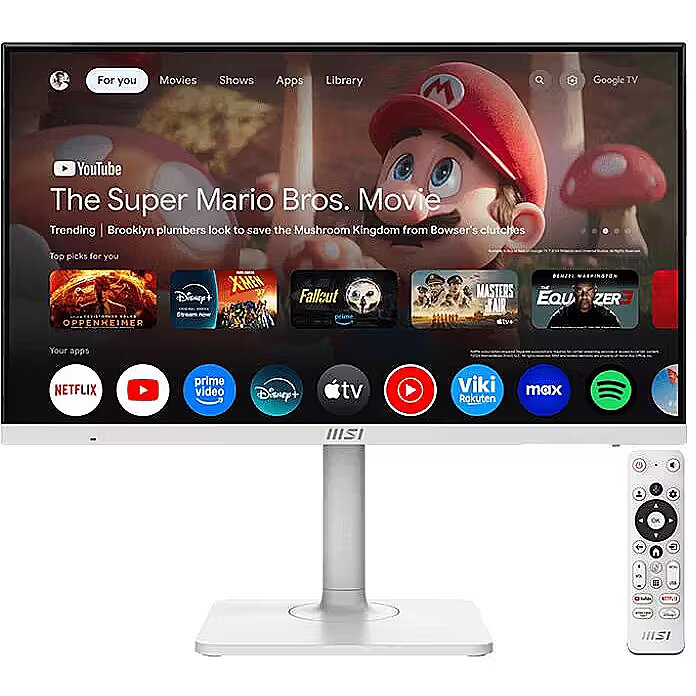
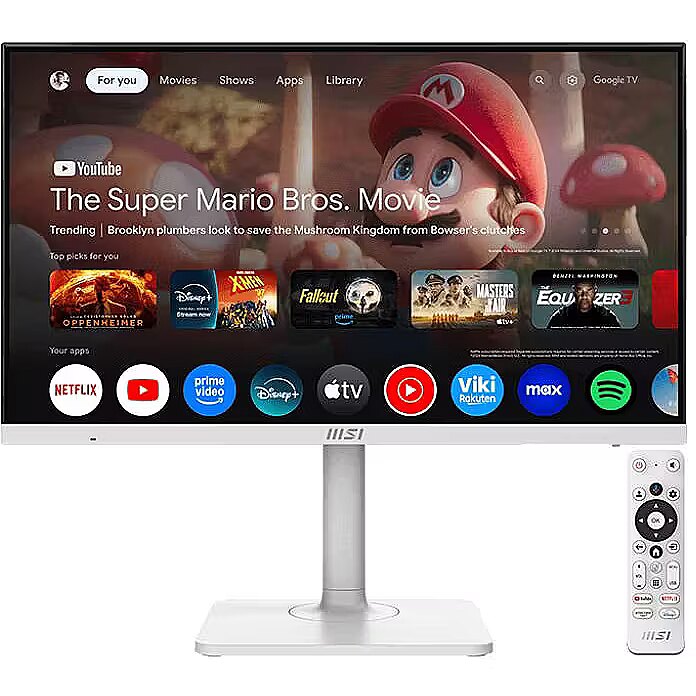
With the 27-inch 4K UHD Modern MD272UPSW Google TV™ Smart Monitor, ¹ ² ³ you can seamlessly stream across platforms with the Multi-Platform Streamer Prime app and enhance productivity through wireless display and Multi Control functions for a flexible, user-friendly experience. Entertainment you love.
With a little help from Google
Google TV brings together movies, shows, and more from all of your subscriptions. Need inspiration? Get curated recommendations, use Google's powerful search to find shows across 10,000+ apps, or browse hundreds of free channels. And with personalized profiles, everyone's experience is customized for them. Stream from your phone
Easily cast movies, shows, photos, and more from your phone or tablet, right to your smart monitor with Google Cast™. One setup across devices with Multi Control
Multiview and Multi Control functions let you manage two devices from a single screen with one set of peripherals, enhancing multitasking efficiency. Make your own home office
Easily access productivity tools or connect to your PC remotely using supported apps on the monitor. Broadcast live across platforms
Use the built-in app, Multi-Platform Streamer Prime, to easily share live content on multiple platforms for a seamless streaming experience. Enhanced gaming experience with 4K UHD and Dolby Audio
Immerse yourself in gaming with 4K UHD visuals and Dolby Audio technology for a captivating experience. Dolby Audio offers modes like Standard, Cinema, and Music, tailored to different scenarios and preferences. Design with Green
Thank you for saving the planet with us
MSI is committed to mitigating the environmental impacts of its businessactivities through green production and supply chain management. The Modern MD272 series meets various energy requirements, for example, Energy Star, ErP Lot 6, CEL, and MEPS...etc., to reduce energy consumption, improve efficiency and protect our only planet.
Ask Google Assistant to find movies, stream apps, play music, and control the monitor — all with your voiceEasily cast movies, shows, photos, and more from your phone or tablet, right to your smart monitor with Google Cast. ¹ ⁹Multi Control function lets you manage two devices from a single screen with one set of peripheralsUse the Multi-Platform Streamer Prime app to easily share live content on multiple platforms for a seamless streaming experienceTwo built-in speakers powered by Dolby Audio, tailored to different scenarios and preferences. ⁴The 4-way adjustable stand with tilt, height, swivel, and pivot to meet your ergonomic needsUSB Type-C with 65W power delivery allows you to connect to and charge your devices effortlessly
Description - Modern MD272UPSW Żyj mądrze, a nie ciężko
Dzięki 27-calowemu, inteligentnemu monitorowi 4K UHD z serii Modern MD272UPSW Google TV Smart Monitor możesz płynnie prowadzić swój streaming na różnych platformach korzystając z aplikacji Multi-Platform Streamer Prime, a także zwiększyć swoją produktywność dzięki bezprzewodowemu przesyłaniu sygnału wideo i funkcjom Multi Control.
*Mysz i klawiatura są sprzedawane oddzielnie.
Rozrywka, którą kochasz.
Z niewielką pomocą Google.
Google TV gromadzi w jednym miejscu filmy, programy i inne treści ze wszystkich subskrypcji. Potrzebujesz inspiracji? Uzyskaj wyselekcjonowane rekomendacje, użyj potężnego wyszukiwania Google, aby znaleźć interesujący Cię materiał wideo w ponad 10 000 platform lub przeglądaj setki bezpłatnych kanałów. A dzięki spersonalizowanym profilom każdy z użytkowników może korzystać z usługi w sposób dostosowany do jego potrzeb.
Streaming sygnału wideo z telefonu
Łatwe przesyłanie filmów, materiałów wideo, prezentacji i pokazów, zdjęć oraz innych materiałów bezpośrednio z telefonu lub tabletu na inteligentny monitor dzięki technologii Google Cast.
Jedna konfiguracja na wszystkich urządzeniach dzięki funkcji Multi Control
Funkcje Multiview i Multi Control pozwalają na zarządzanie dwoma urządzeniami z jednego ekranu za pomocą jednego zestawu urządzeń peryferyjnych. W ten sposób możesz zwiększyć wydajność swojej pracy wielozadaniowej.
Stwórz własne domowe biuro
Łatwy dostęp do narzędzi zwiększających produktywność lub możliwość bezproblemowego, zdalnego łączenia się z komputerem za pomocą aplikacji dostępnych na monitorze.
Transmisja na żywo na różnych platformach
Korzystaj z wbudowanej aplikacji Multi-Platform Streamer Prime, aby łatwo i płynnie udostępniać jednocześnie swoje treści wideo na żywo na wielu platformach.
Lepsze wrażenia w grach dzięki 4K UHD i Dolby Audio
Zanurz się w grze dzięki rozdzielczości 4K UHD oraz technologii Dolby Audio. Ciesz się wciągającymi wrażeniami. System Dolby Audio oferuje takie tryby jak Standardowy, Kinowy i tryb Muzyki, które dostosowane są do różnych scenariuszy i preferencji użytkownika.
Zielona konstrukcja
Dziękujemy za to, że razem z nami ratujesz planetę
Firma MSI jest zaangażowana w łagodzenie wpływu swojej działalności biznesowej na środowisko poprzez ekologiczną produkcję i zrównoważone zarządzanie łańcuchem dostaw.
Monitory z serii Modern MD272 spełnia różne wymagania energetyczne, na przykład produkty te są zgodne z normami Energy Star, ErP Lot 6, CEL i MEPS...itd. po to, aby zmniejszyć zużycie energii, poprawić wydajność i chronić naszą jedyną planetę.
Design - Feet colour - White
Design - Market positioning - Smart
Design - Product colour - White
Designation - CE+WEEE
Digital horizontal frequency Display - 111 - 138.9 kHz
Digital vertical frequency Display - 50 - 60 Hz
dimension depth - 200 mm
dimension height - 465 mm
dimension weight - 9200 g
dimension width - 710 mm
Display - Anti-glare screen - Yes
Display - Aspect ratio - 16:9
Display - Colour depth - 10 bit
Display - Colour gamut - 98%
Display - Colour gamut standard - DCI-P3
Display - Contrast ratio (dynamic) - 100000000:1
Display - Contrast ratio (typical) - 1000:1
Display - DCI-P3 coverage - 98%
Display - Digital horizontal frequency - 111 - 138.9 kHz
Display - Digital vertical frequency - 50 - 60 Hz
Display - Display brightness (typical) - 300 cd/m²
Display - Display diagonal - 68.6 cm (27")
Display - Display number of colours - 1.07 billion colours
Display - Display resolution - 3840 x 2160 pixels
Display - HD type - 4K Ultra HD
Display - High Dynamic Range (HDR) supported - Yes
Display - Maximum refresh rate - 60 Hz
Display - Native aspect ratio - 16:9
Display - Panel type - IPS
Display - Pixel pitch - 0.1554 x 0.1554 mm
Display - Response time - 4 ms
Display - Response time measurement type - GTG (Gray to Gray)
Display - Screen shape - Flat
Display - sRGB coverage (typical) - 127%
Display - Supported graphics resolutions - 3840 x 2160
Display - Supported video modes - 2160p
Display - Touchscreen - No
Display - Viewable size, horizontal - 59.7 cm
Display - Viewable size, vertical - 33.6 cm
Display - Viewing angle, horizontal - 178°
Display - Viewing angle, vertical - 178°
Display brightness (typical) Display - 300 cd/m²
Display diagonal Display - 68.6 cm (27")
Display number of colours Display - 1.07 billion colours
DisplayPorts quantity Ports & interfaces - 1
DisplayPort version Ports & interfaces - 1.4a
Display resolution Display - 3840 x 2160 pixels
Display surface - Matt
Dot pitch - 0.1554 mm
ean - 4711377256889
Energy class - F
Energy consumption (HDR) per 1000 hours Power - 45 kWh
Energy consumption (SDR) per 1000 hours Power - 26 kWh
Energy efficiency class (HDR) Power - G
Energy efficiency class (SDR) Power - F
Energy efficiency class Energy Efficiency - F
Energy efficiency scale Power - A to G
Energy label - Pobierz
EPREL Registration Number Energy Efficiency - 2189402
EPREL Version Number Energy Efficiency - 3
Ergonomics - Adjustable height (max) - 11 cm
Ergonomics - Cable lock slot - Yes
Ergonomics - Cable lock slot type - Kensington
Ergonomics - Height adjustment - Yes
Ergonomics - Panel mounting interface - 75 x 75 mm
Ergonomics - Pivot - Yes
Ergonomics - Pivot angle - -90 - 90°
Ergonomics - Swivel angle range - -30 - 30°
Ergonomics - Swivelling - Yes
Ergonomics - Tilt adjustment - Yes
Ergonomics - Tilt angle range - -5 - 20°
Ergonomics - VESA mounting - Yes
Ethernet LAN Network - Yes
Feet colour Design - White
Flicker-free technology Performance - Yes
GTIN - 0824142381083
GTIN - 824142381083
GTIN - 4711377256889
GTIN - 4711377256902
guarantee - 24
guarantee_type - normal
HDMI Ports & interfaces - Yes
HDMI ports quantity Ports & interfaces - 1
HDMI version Ports & interfaces - 2.0b
HD type Display - 4K Ultra HD
Headphone out Ports & interfaces - Yes
Height (with stand) Weight & dimensions - 201.8 mm
Height adjustment - Yes
Height adjustment Ergonomics - Yes
Height adjustment range - 110 mm
Height with stand - 413.4 mm
High Dynamic Range (HDR) supported Display - Yes
I/O connectors - 1 x 3,5 mm minijack
I/O connectors - 1 x DisplayPort
I/O connectors - 1 x HDMI
I/O connectors - 1 x RJ-45 LAN
I/O connectors - 1 x USB (Type C)
I/O connectors - 2 x USB 2.0
Included Accessories - 1x HDMI™ Cable (2.0b), 1x USB Type-C Cable, 1x Power Cord (C13), 1x Quick Guide, 4x VESA Wall Mount Screw, 1x Remote Control
Kensington Security Slot - Tak
LongDesc - Live Smarter not HarderWith the 27-inch 4K UHD Modern MD272UPSW Google TV™ Smart Monitor, ¹ ² ³ you can seamlessly stream across platforms with the Multi-Platform Streamer Prime app and enhance productivity through wireless display and Multi Control functions for a flexible, user-friendly experience.Entertainment you love.With a little help from GoogleGoogle TV brings together movies, shows, and more from all of your subscriptions. Need inspiration? Get curated recommendations, use Google's powerful search to find shows across 10,000+ apps, or browse hundreds of free channels. And with personalized profiles, everyone's experience is customized for them.Stream from your phoneEasily cast movies, shows, photos, and more from your phone or tablet, right to your smart monitor with Google Cast™.One setup across devices with Multi ControlMultiview and Multi Control functions let you manage two devices from a single screen with one set of peripherals, enhancing multitasking efficiency.Make your own home officeEasily access productivity tools or connect to your PC remotely using supported apps on the monitor.Broadcast live across platformsUse the built-in app, Multi-Platform Streamer Prime, to easily share live content on multiple platforms for a seamless streaming experience.Enhanced gaming experience with 4K UHD and Dolby AudioImmerse yourself in gaming with 4K UHD visuals and Dolby Audio technology for a captivating experience. Dolby Audio offers modes like Standard, Cinema, and Music, tailored to different scenarios and preferences. Design with GreenThank you for saving the planet with usMSI is committed to mitigating the environmental impacts of its businessactivities through green production and supply chain management.The Modern MD272 series meets various energy requirements, for example, Energy Star, ErP Lot 6, CEL, and MEPS...etc., to reduce energy consumption, improve efficiency and protect our only planet.
LongProductName - 68.6cm (27") 4K Ultra HD 3840 x 2160 IPS, 16:9, 300cd/m², 1.07B, 4ms, 178°/178°, 1000:1
LongSummaryDescription - MSI Modern MD272UPSW. Display diagonal: 68.6 cm (27"), Display resolution: 3840 x 2160 pixels, HD type: 4K Ultra HD, Response time: 4 ms, Native aspect ratio: 16:9, Viewing angle, horizontal: 178°, Viewing angle, vertical: 178°. Built-in speaker(s). Built-in USB hub, USB hub version: 2.0. VESA mounting, Height adjustment. Product colour: White
Market positioning Design - Smart
Matrix type - TFT IPS
Maximum refresh rate Display - 60 Hz
Model - MODERN MD272UPSW
Model - Modern MD272UPSW
Model name - Modern MD272UPSW
Multimedia - Built-in camera - No
Multimedia - Built-in speaker(s) - Yes
Multimedia - Number of speakers - 2
Multimedia - RMS rated power - 6 W
name - Monitor 27 inches Modern MD272UPSW LED/UHD/Flat/60Hz/white
Native aspect ratio Display - 16:9
Network - Bluetooth - Yes
Network - Bluetooth version - 5.0
Network - Ethernet LAN - Yes
Network - Wi-Fi - Yes
Network - Wi-Fi standards - 802.11a, 802.11b, 802.11g, Wi-Fi 4 (802.11n), Wi-Fi 5 (802.11ac)
Number of colors - 1,07 mld
Number of speakers Multimedia - 2
NVIDIA G-SYNC Performance - No
Other features - Compatibility - PC, Mac, PS5™, PS4™, Xbox, Mobile, Notebook
Package depth Packaging data - 464 mm
Package height Packaging data - 195 mm
Package type Packaging data - Box
Package weight Packaging data - 9.1 kg
Package width Packaging data - 702 mm
Packaging data - Package depth - 464 mm
Packaging data - Package height - 195 mm
Packaging data - Package type - Box
Packaging data - Package weight - 9.1 kg
Packaging data - Package width - 702 mm
Panel mounting interface Ergonomics - 75 x 75 mm
Panel type Display - IPS
Performance - AMD FreeSync - No
Performance - Flicker-free technology - Yes
Performance - NVIDIA G-SYNC - No
Pivot angle Ergonomics - -90 - 90°
Pivot Ergonomics - Yes
Pixel pitch Display - 0.1554 x 0.1554 mm
Ports & interfaces - Built-in USB hub - Yes
Ports & interfaces - DC-in jack - Yes
Ports & interfaces - DisplayPorts quantity - 1
Ports & interfaces - DisplayPort version - 1.4a
Ports & interfaces - HDMI - Yes
Ports & interfaces - HDMI ports quantity - 1
Ports & interfaces - HDMI version - 2.0b
Ports & interfaces - Headphone out - Yes
Ports & interfaces - USB hub version - 2.0
Ports & interfaces - USB Type-A downstream ports quantity - 2
Ports & interfaces - USB Type-C DisplayPort Alternate Mode - Yes
Power - AC input frequency - 50/60 Hz
Power - AC input voltage - 100 - 240 V
Power - Energy consumption (HDR) per 1000 hours - 45 kWh
Power - Energy consumption (SDR) per 1000 hours - 26 kWh
Power - Energy efficiency class (HDR) - G
Power - Energy efficiency class (SDR) - F
Power - Energy efficiency scale - A to G
Power - Power consumption (off) - 0.3 W
Power - Power consumption (standby) - 0.5 W
Power - Power supply type - Internal
Power consumption - 26 W
Power consumption (off) Power - 0.3 W
Power consumption (standby) Power - 0.5 W
Power supply type Power - Internal
producer - MSI
Product colour Design - White
ProductName - Modern MD272UPSW
Product Net Weight - 6.3 kg
Refresh rate - 60 Hz
Resolution - 3840 x 2160
Response time - 4 ms
Response time Display - 4 ms
Response time measurement type Display - GTG (Gray to Gray)
RMS rated power Multimedia - 6 W
Screen shape Display - Flat
Screen size (diag.) - 27"
ShortSummaryDescription - MSI Modern MD272UPSW, 68.6 cm (27"), 3840 x 2160 pixels, 4K Ultra HD, 4 ms, White
Speakers built-in - Yes
sRGB coverage (typical) Display - 127%
Static contrast - 1 000:1
Summary - MSI Modern MD272UPSW. Display diagonal: 68.6 cm (27"), Display resolution: 3840 x 2160 pixels, HD type: 4K Ultra HD, Response time: 4 ms, Native aspect ratio: 16:9, Viewing angle, horizontal: 178°, Viewing angle, vertical: 178°. Built-in speaker(s). Built-in USB hub, USB hub version: 2.0. VESA mounting, Height adjustment. Product colour: White
Supported graphics resolutions Display - 3840 x 2160
Supported video modes Display - 2160p
Sustainability - Sustainability certificates - ENERGY STAR
Sustainability certificates Sustainability - ENERGY STAR
Swivel angle range Ergonomics - -30 - 30°
Swivelling Ergonomics - Yes
Tilt adjustment Ergonomics - Yes
Tilt angle range Ergonomics - -5 - 20°
Title - MSI Modern MD272UPSW computer monitor 68.6 cm (27") 3840 x 2160 pixels 4K Ultra HD White
Touch screen - No
Touchscreen Display - No
Transreflective technology - LED
TV tuner built-in - No
Unit Box Height - 0.465
Unit Box Length - 0.7
Unit Box Width - 0.2
Unit Calculated Volume - 0.0651 cubm
Unit Calculated Weight - 9.4 kg
Units per Pallet - 0
URL - https://www.msi.com/Smart-Monitor/Modern-MD272UPSW
USB hub version Ports & interfaces - 2.0
USB Type-A downstream ports quantity Ports & interfaces - 2
USB Type-C DisplayPort Alternate Mode Ports & interfaces - Yes
Vendor Homepage - https://www.msi.com/Smart-Monitor/Modern-MD272UPSW
vendpn - Modern MD272UPSW
VESA - 75 x 75
VESA mounting Ergonomics - Yes
Viewable size, horizontal Display - 59.7 cm
Viewable size, vertical Display - 33.6 cm
Viewing angle, horizontal - 178 °
Viewing angle, horizontal Display - 178°
Viewing angle, vertical - 178 °
Viewing angle, vertical Display - 178°
Visible area, horizontal - 596.736 mm
Visible area, vertical - 335.664 mm
Warranty - 36 months
WarrantyInfo -
Web camera - None
Weight - 6.3 kg
Weight & dimensions - Depth (with stand) - 413.4 mm
Weight & dimensions - Height (with stand) - 201.8 mm
Weight & dimensions - Weight (with stand) - 6.3 kg
Weight & dimensions - Width (with stand) - 613.5 mm
Weight (with stand) Weight & dimensions - 6.3 kg
Wi-Fi Network - Yes
Wi-Fi standards Network - 802.11a, 802.11b, 802.11g, Wi-Fi 4 (802.11n), Wi-Fi 5 (802.11ac)
Width - 613.5 mm
Width (with stand) Weight & dimensions - 613.5 mm
WiFi - Yes





 DVI is a digital standard and ensures high image quality, however, thanks to the big size of the plug and the inability of the standard to develop further due to a few technical restrictions this type of connection is gradually losing its popularity to modern HDMI and DisplayPort standards.







